AV Cable – The Ultimate Guide You Need to Know
Home » AV Cable – The Ultimate Guide You Need to Know
When setting up a home theater, a professional conference room, or any audiovisual (AV) system, AV cables play a crucial role. Different cables vary in terms of signal transmission methods, video and audio quality, and suitable applications. Choosing the right AV cables allows you to fully leverage your equipment’s performance while avoiding issues such as signal interference and degraded image quality.
But how do you choose the right AV cables? We’re sure you’ve faced this dilemma before. This article will systematically outline the types of mainstream AV cables, their core applications, and key purchasing considerations to help you make an informed choice in the complex and diverse cable market.
What Is an AV Cable and What Signals Can It Carry?
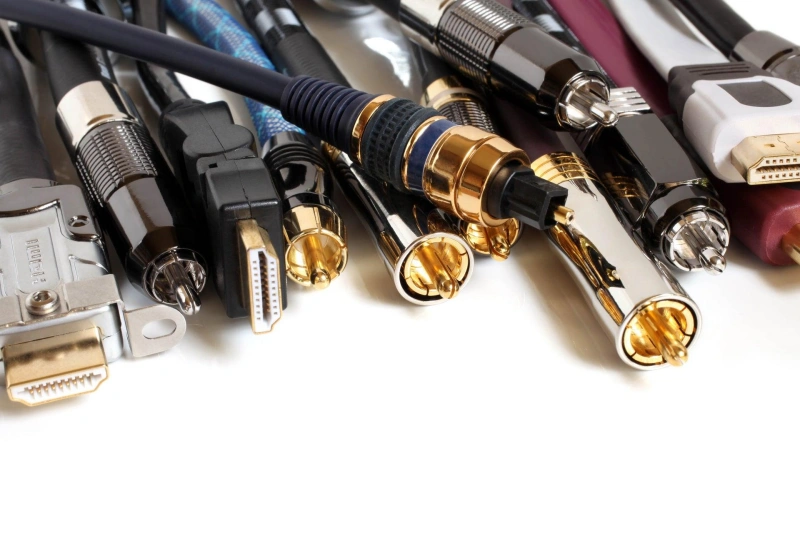
AV Cable is short for Audio/Video Cable, a type of cable used to transmit audio and video signals between devices. Simply put, its function is to transmit audio or video signals generated by one device to another.
Different AV cables can transmit either analog or digital signals; they can transmit audio only, video only, or both audio and video simultaneously.
Analog vs. Digital AV Signals
| Comparison | Analog AV Signal | Digital AV Signal |
|---|---|---|
| Signal Type | Continuous electrical signals | Digital data (0/1 encoding) |
| Common Interfaces | RCA (red/white/yellow), 3.5mm audio | HDMI, DisplayPort, digital audio interfaces |
| Transmission Content | Audio, video, or both | HD video, digital audio, multimedia data |
| Advantages | Simple design, legacy compatibility, lower cost | Better noise resistance, HD support, multi-channel audio |
| Limitations | Sensitive to interference over long distances | Requires interface and protocol compatibility |
| Applications | Older TVs, DVD players, basic AV connections | HD TVs, gaming consoles, computers, home theaters |
| Selection Tips | Check connectors, shielding, and cable length | Check compatibility, protocols, and transmission distance |
| Common Mistakes | Assuming similar connectors are always compatible | Replacing connectors without signal conversion |
| Conversion | Direct connection with compatible devices | Requires a converter for analog/digital conversion |
| How to Choose | ① Check device interfaces → ② Identify signal type → ③ Select based on application needs | |
Audio-Only, Video-Only, and Combined Connections
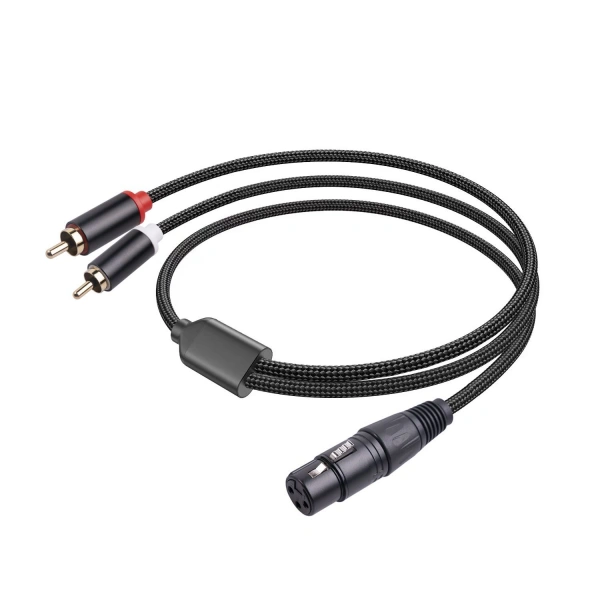
AV cables can be divided into three categories based on the type of content they transmit:
1. Audio-Only Cable
An audio-only cable transmits only audio signals and does not carry video signals.
Common applications:
- Connecting an audio player to an amplifier;
- Connecting a TV to a sound system;
- Connecting a microphone or audio device to a system.
Considerations when selecting:
- Cable length;
- Shielding performance;
- Connector compatibility.
2. Video-Only Cable
A video-only cable transmits only video signals.
Factors to consider when selecting a video cable:
- Resolution requirements;
- Refresh rate;
- Transmission distance;
- Signal type.
3. Combined Audio + Video Cable
This type of cable transmits both audio and video signals.
For example:
Composite AV Cable
Traditional three-color cable (red, white, and yellow):
- Yellow wire: Video;
- Red and white wires: Left and right audio channels.
Which AV Cable Types Are Used Today?
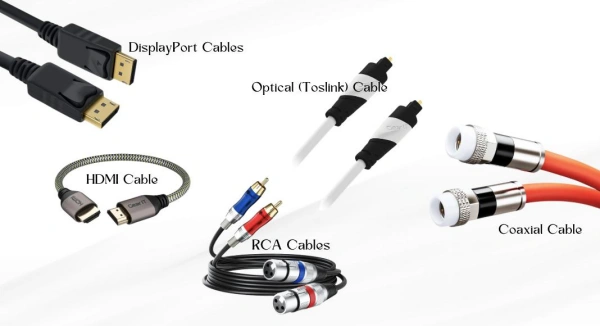
There are many types of AV cables in use today, which can be divided into several major categories:
- Digital audio/video cables: HDMI, DisplayPort, primarily used for modern display devices;
- Analog video cables: RCA Composite, Component Video, primarily used for older devices;
- Audio-only cables: Optical, Coaxial, RCA, and 3.5 mm, used for audio transmission;
- Professional or legacy formats: VGA, DVI, and SDI, commonly found in older computer equipment, broadcasting, and industrial applications.
When making a selection, you need to consider three factors:
- What signal formats the device’s inputs and outputs support;
- Whether you need to transmit audio, video, or both;
- Whether the usage environment has specific requirements regarding distance, stability, and interference resistance.
HDMI and DisplayPort for Digital Audio and Video
HDMI
HDMI is a common digital AV connection standard in home entertainment and consumer electronics. It can transmit both digital video and digital audio through a single cable and is widely used in televisions, game consoles, Blu-ray players, and more.
The advantage of HDMI is its ease of installation: a single cable handles both video and audio transmission.
However, keep the following in mind when selecting an HDMI cable:
- Both devices must support the corresponding features;
- Different HDMI versions and cable specifications offer varying levels of support;
- For long-distance installations, signal attenuation must be taken into account.
Tip: Different devices may support different video formats, refresh rates, or audio features, so be sure to check the device requirements when selecting a cable—don’t just look at the connector.
DisplayPort
DisplayPort is another type of digital audio and video interface, primarily used in computer monitors, graphics cards, workstations, and more.
It can also transmit digital video and audio, but compared to HDMI, it is more commonly found in PCs and professional display applications.
DisplayPort is suitable for:
- Multi-monitor setups;
- High-performance computer systems;
- Applications with high display performance requirements.
When selecting a DisplayPort connection, keep the following in mind:
- Whether the output and input ports support the corresponding modes;
- Whether the connection direction is correct;
- Whether active conversion is required when using an adapter cable.
RCA Composite and Component Video
| Comparison | RCA Composite Video | Component Video |
|---|---|---|
| Signal Type | Analog video | Analog video |
| Transmission Method | Combined video signal over one cable | Separate Y, Pb, Pr video signals |
| Common Interfaces | Yellow RCA video connector (with red/white audio) | Three RCA connectors: Y / Pb / Pr |
| Main Applications | DVD players, older TVs, game consoles, AV systems | Older HDTVs, HD DVD players, professional displays |
| Advantages | Simple connection, wide compatibility, supports legacy devices | Better image quality, improved color and detail |
| Limitations | Limited video quality, interference sensitive, not ideal for HD | Requires multiple cables, limited use with modern devices |
| Applications | Legacy devices and basic video playback | Older HD devices requiring better analog video quality |
| Modern Alternatives | HDMI, DisplayPort, and other digital interfaces | HDMI, DisplayPort, and other digital interfaces |
Optical, Coaxial, RCA, and 3.5 mm Audio
In an AV system, the choice of audio cable depends on the type of audio you need to transmit and the device interfaces.
Optical
Optical audio uses light signals to transmit sound, rather than traditional electrical signals.
Common Applications:
- Connecting a TV to a soundbar;
- Home theater systems;
- AV receivers.
Advantages:
- Less susceptible to electromagnetic interference;
- Suitable for digital audio connections.
Coaxial Digital Audio
Coaxial digital audio uses electrical signals to transmit digital audio.
Common Applications:
- Home theaters;
- Connecting audio devices.
Common Misconceptions:
Not all RCA cables can be used as digital coaxial cables. Digital coaxial transmission has specific requirements for cable characteristics, and standard analog audio cables may not be suitable for all applications.
RCA Audio
Red: Right channel;
White: Left channel.
Suitable for:
- Older amplifiers;
- CD players;
- Audio equipment.
Advantages:
- Compact;
- Highly versatile.
Disadvantages:
- Not suitable for long-distance professional audio transmission;
- Susceptible to mechanical damage.
VGA, DVI, SDI, and Other Legacy or Professional Formats
| Comparison | VGA | DVI | SDI |
|---|---|---|---|
| Full Name | Video Graphics Array | Digital Visual Interface | Serial Digital Interface |
| Signal Type | Analog video | Analog or digital video | Digital video |
| Common Interfaces | 15-pin VGA connector | DVI-A, DVI-D, DVI-I | BNC connector + coaxial cable |
| Main Applications | Older monitors, projectors, education displays | Older monitors, graphics cards, professional displays | Broadcasting, cameras, video production |
| Audio Support | No audio transmission | No audio transmission | Video-focused, audio support depends on system |
| Advantages | Legacy compatibility, simple design | Supports both analog and digital displays | Reliable professional video transmission |
| Limitations | Not suitable for HD, gradually outdated | Older interface with fewer features than HDMI | Higher equipment cost and professional requirements |
| Suitable Applications | Old computers, projectors, legacy industrial displays | Older displays and some professional applications | Broadcast, film production, professional video systems |
| Not Recommended For | HD entertainment and modern gaming devices | Devices requiring single-cable audio and video | Standard home TV connections |
How Do AV Cable Types Compare?
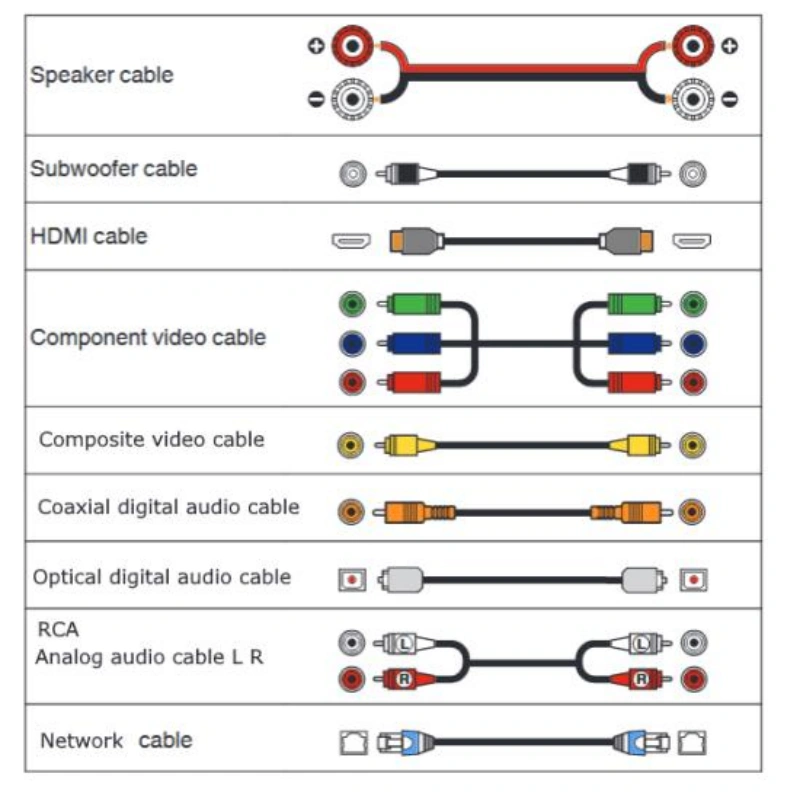
The differences between various AV cables are reflected in the following four aspects:
- Resolution: Determines how much detail an image can display.
- Bandwidth: Refers to a cable’s ability to transmit data per unit of time. Higher resolution, refresh rates, and color depth require greater bandwidth.
- Audio Support: Indicates whether the cable can transmit audio signals simultaneously.
- Typical Distance: The effective transmission distance varies among different cables due to signal attenuation, environmental interference, and device requirements.
When actually selecting an AV cable, you shouldn’t simply assume that “digital is always better than analog” or that “the more expensive, the better.” The correct approach is to choose the most suitable type based on your specific equipment, signal requirements, and installation environment.
Resolution, Bandwidth, Audio Support, and Typical Distance
| Cable Type | Signal Type | Resolution & Bandwidth | Audio Support | Typical Distance | Common Applications |
|---|---|---|---|---|---|
| HDMI | Digital | High bandwidth for HD and 4K displays | Audio and video transmission | Common for short distances; longer runs may need signal boosters | TVs, gaming consoles, home theaters |
| DisplayPort | Digital | High bandwidth for high refresh rates and multi-monitor setups | Audio transmission | Common in desktop connections | PC monitors, graphics cards, workstations |
| DVI | Digital / Analog | Supports higher resolutions but fewer features than modern interfaces | No audio transmission | Suitable for short display connections | Older monitors, graphics cards |
| VGA | Analog | Limited resolution; quality drops over long distances | No audio transmission | Sensitive to distance and environment | Older computers, projectors |
| RCA Composite | Analog | Low video bandwidth for standard-definition video | Audio support with separate connectors | Common for short-distance use | DVD players, older TVs, retro game consoles |
| Component Video | Analog | Better analog video quality than Composite | Requires separate audio cables | Common for short-distance use | Older HD devices |
| SDI | Digital | Designed for stable professional video transmission | Depends on system configuration | Supports professional long-distance transmission | Broadcasting, film production |
Consumer AV vs. Commercial AV Requirements
| Comparison | Consumer AV | Commercial AV |
|---|---|---|
| Main Goal | Easy use and reasonable cost | Stable operation and reliable transmission |
| Common Equipment | TVs, gaming consoles, home audio systems | Camera systems, conference systems, broadcast equipment |
| Priority | Compatibility and easy installation | Signal integrity and long-term reliability |
| Cable Requirements | Standardized and easy to install | Focus on design, protection, and environmental durability |
| Common Interfaces | HDMI, RCA, DisplayPort | SDI, professional HDMI, custom cable assemblies |
| Selection Focus | Whether devices connect properly | Whether the system meets long-term operation requirements |
How Do You Choose the Right AV Cable?
A suitable cable must meet all of the following requirements: interface matching, signal compatibility, performance requirements, and installation environment requirements.
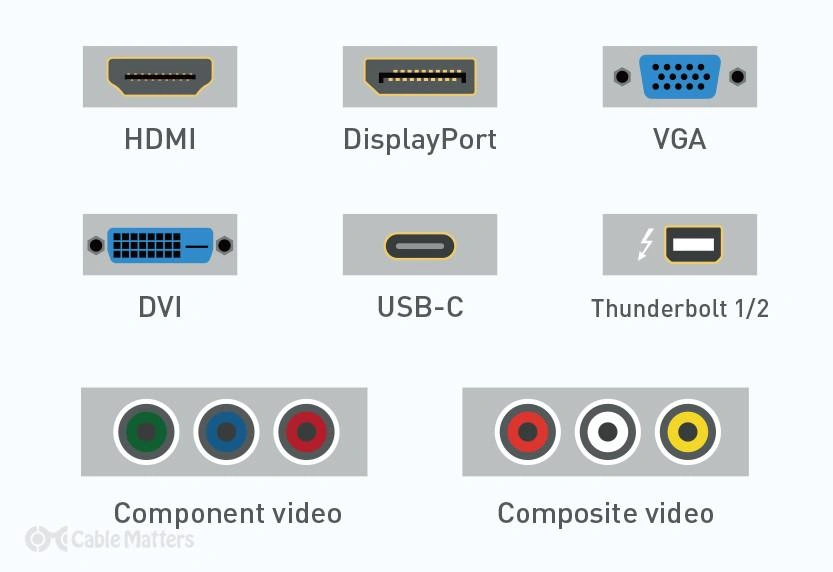
Match the Ports, Signal Direction, and Protocol
1. Check the Device Connection Types
Check the connection types of the signal source and the receiving device. A game console connected to a TV might use an HDMI cable, an older DVD player connected to an older TV might use a three-color (red, white, and yellow) RCA AV cable, and a PC connected to a monitor typically uses a DisplayPort cable. Keep in mind that you shouldn’t rely solely on the physical appearance of the connector to determine compatibility; connectors with the same shape may transmit different signals.
2. Confirm the Signal Flow Direction
When connecting devices, strictly follow the unidirectional “source → destination” principle. The correct connection is to connect the laptop’s HDMI OUT to the monitor’s HDMI IN. It’s especially important to note that some cables and adapters have strict directional restrictions.
3. Verify the Transmission Protocol
A protocol can be understood as the “rules of communication” between devices. If one device outputs digital video while another older device only supports analog video, they will not be able to communicate properly even if their connectors have the same shape. In this case, you’ll need a dedicated signal converter.
Check Resolution, Refresh Rate, Audio Format, and Cable Length
Once you have confirmed interface compatibility, you need to check whether the cable meets the actual performance requirements based on the following four key criteria:
1. Resolution
Resolution determines the amount of pixel information in an image. The higher the resolution, the larger the image data volume, and the greater the bandwidth requirements for the cable. When purchasing, ensure that the cable specifications can meet the maximum resolution requirements of both the output device and the display.
2. Refresh Rate
The refresh rate refers to the number of times the screen updates the image per second. Different scenarios have different refresh rate requirements. If the cable’s bandwidth is insufficient, it may not be able to achieve the target refresh rate. Therefore, we recommend that you consider resolution, refresh rate, and the cable’s bandwidth capacity together as part of a comprehensive evaluation.
3. Audio Format
If you need to transmit audio simultaneously, you must verify the cable’s audio support capabilities. HDMI and DisplayPort support simultaneous audio and video transmission, making them suitable for gaming consoles or home theater systems. VGA does not support audio; DVI requires a separate audio connection; and RCA supports only analog audio.
4. Cable Length
The longer the cable, the higher the risk of signal attenuation and interference during transmission, and the more likely signal integrity is to degrade. For short-distance connections, a standard cable is sufficient. However, for long-distance cabling scenarios such as conference rooms and commercial displays, you should select a cable with higher specifications.
Evaluate Shielding, Jacket Rating, Bend Radius, and Installation Environment
If the cable is used in commercial, industrial, or complex environments requiring long-term operation, in addition to interface compatibility, you also need to evaluate its physical structure and installation specifications:
1. Shielding
The shielding layer is a key component for protecting against electromagnetic interference. In high-interference environments—such as those near industrial equipment or in areas with dense cable routing—it is recommended to select cables with high-quality shielding designs to prevent noise generated by motors or power lines from affecting signal quality.
2. Jacket Rating
The jacket determines the cable’s environmental resilience. When selecting a cable, evaluate the installation conditions—whether it will be used in a fixed installation, a frequently moved drag chain, or an area subject to mechanical abrasion and pressure—to choose a jacket material with the appropriate abrasion resistance, flame retardancy, or flexibility rating.
3. Minimum Bending Radius
This refers to the smallest radius at which the cable can be safely bent without damage. Excessive bending can directly cause internal conductor breaks or damage to the shielding layer, leading to signal attenuation. During installation, forceful bending or prolonged compression must be strictly avoided; adhere strictly to specifications and maintain adequate bending clearance.
4. Installation Environment
Different scenarios place different priorities on cables. Home entertainment focuses on connector compatibility and length. Office conference rooms emphasize cabling distance and stability. Industrial environments require extremely high levels of shielding and mechanical reliability.
When Do You Need an Adapter, Converter, or Extender?
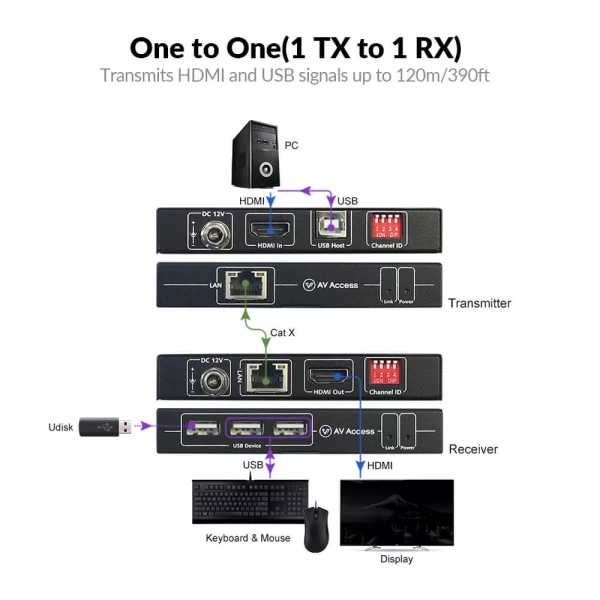
In audio and video connections, adapters, converters, and extenders each address different issues.
Adapter
An adapter resolves the issue of different interface types while the signals themselves remain compatible. You can think of it as “changing the connection method”—for example, converting a USB-C port to an HDMI port—provided that the digital signal protocols used by both are compatible.
Converter
A converter addresses the fundamental issue of different signal types or protocols. This is equivalent to “changing the signal’s language”—for example, converting an analog VGA signal into a digital HDMI signal. This type of conversion requires active processing by a chip and cannot be achieved with a simple adapter.
Extender
It addresses the issue of transmission distances exceeding the capabilities of standard cables. Its function is to “extend the signal’s reach”; through technologies such as signal amplification or electro-optical conversion, it ensures the signal remains stable during long-distance transmission and prevents signal attenuation.
Passive Adapters vs. Active Signal Conversion
| Comparison | Passive Adapter | Active Converter |
|---|---|---|
| Function | Changes connector formats | Converts signal types or protocols |
| Electronic Chip | No | Yes |
| Power Requirement | No power required | May require external power |
| Suitable For | Compatible signals | Incompatible signals |
| Cost | Lower cost | Higher cost |
| Common Mistakes | Using it for signal conversion | Ignoring direction and specification limits |
HDBaseT, Fiber HDMI, and Long-Distance Distribution
When AV signals need to be transmitted over longer distances, standard cables may not meet the requirements.
In such cases, consider the following options:
- HDBaseT;
- Fiber HDMI;
- Professional AV extender systems.
HDBaseT
HDBaseT is a transmission technology used in professional AV systems that transmits AV and control signals over standard network cables.
Commonly used in:
- Conference rooms;
- Classrooms;
- Commercial display systems;
- Large-scale installation projects.
Advantages:
- Utilizes existing cabling infrastructure;
- Suitable for fixed installations;
- Supports transmission of video, audio, and certain control signals.
Suitable for:
- Video walls;
- Projection systems;
- Long-distance conference room connections.
Not suitable for simple, short-distance home connections.
Fiber HDMI
Fiber HDMI uses optical fiber to transmit HDMI signals.
It is primarily used for:
- Longer-distance HDMI connections;
- High-bandwidth video requirements;
- Environments with strong electromagnetic interference.
Compared to standard cables, fiber-optic solutions offer:
- Lower signal loss;
- Better resistance to electromagnetic interference.
Long-Distance Distribution
When a single video source needs to connect to multiple display devices or cover a large area, simply extending the cable length may not be feasible.
Common solutions:
- HDMI splitter;
- Matrix switch;
- HDBaseT system;
- Fiber-optic transmission system.
The choice of solution depends on:
- Number of displays;
- Distance;
- Whether control functions are required;
- Maintenance requirements.
Why Do AV Cables Fail or Lose Signal?
When audio or video cables malfunction, many people may assume that “the cable is broken.” Problems such as no signal, a black screen, screen flickering, or loss of audio may stem from abnormalities in the entire signal chain. Compatibility, bandwidth, connection, or environmental issues at any point in the chain can cause malfunctions.
Here are three common causes of signal chain failure:
- Failed handshake;
- Insufficient bandwidth;
- Interference;
Handshake, Bandwidth, Interference, and Connector Problems
Four Causes of Audio-Video (AV) Signal Failures:
1. Handshake Issues
This is the “confirmation” process by which devices exchange protocols such as resolution and HDCP. Failure can result in a black screen or no sound. This is commonly caused by device incompatibility, EDID data conflicts, or incorrect power-on sequence. It is recommended to restart the devices in the order “monitor → intermediate device → signal source” to force a new handshake.
2. Insufficient Bandwidth
When the resolution or refresh rate exceeds the cable’s capacity, flickering or intermittent black screens may occur. It is recommended to lower the image quality or bypass intermediate devices by connecting directly to test the system; if normal operation is restored, this indicates a bandwidth bottleneck.
3. Interference Issues
External electromagnetic interference from power lines or motors can cause snow or noise in analog signals, or black screens or interruptions in digital signals. Minimize parallel routing with high-voltage power lines and use highly shielded cables.
4. Connector Issues
These are typically caused by poor physical connections, such as loose plugs, plugs not inserted all the way, oxidized connectors, or excessive cable bending. Additionally, excessive use of adapters increases the number of potential failure points. Ensuring a secure connection and minimizing the use of adapters are fundamental precautions.
A Step-by-Step AV Cable Troubleshooting Checklist
| Step | Check Item | Purpose |
|---|---|---|
| 1 | Input source and interfaces | Identify basic connection errors |
| 2 | Power cycle and restart sequence | Restore device communication |
| 3 | Remove adapters, switches, and extra devices | Simplify the signal chain |
| 4 | Replace with a known-good cable | Check for cable faults |
| 5 | Check resolution and audio settings | Rule out format incompatibility |
| 6 | Check cable length and interference | Identify signal loss issues |
| 7 | Inspect connector condition | Identify mechanical connection problems |
How Should B2B Buyers Specify a Custom AV Cable Assembly?
For B2B buyers, the difference between a custom AV cable assembly and a standard off-the-shelf cable is that you need to specify the electrical requirements, mechanical design, production validation, and quality documentation.
A complete custom AV cable assembly specification must define the following:
- Connector;
- Pinout;
- Length;
- Shielding;
- Compliance;
- Test Requirements
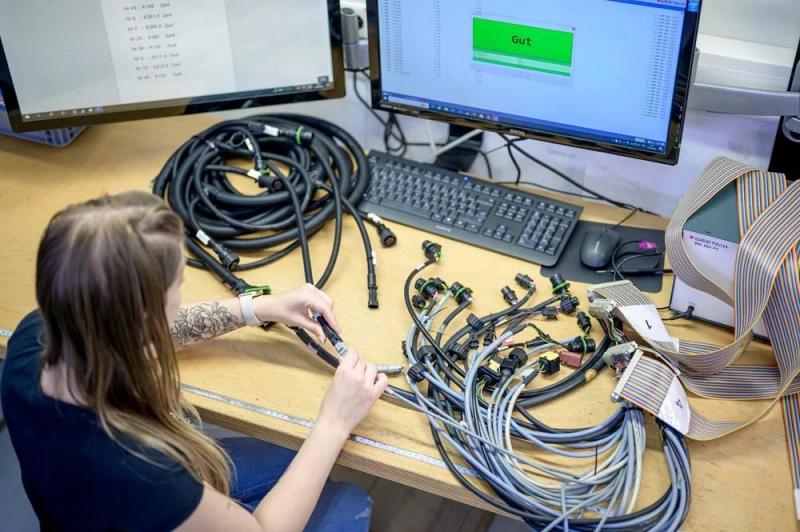
Connector, Pinout, Length, Shielding, Compliance, and Test Requirements
The specifications for custom AV harnesses must include the following elements to ensure that suppliers accurately understand the requirements and to minimize mass production risks.
1. Connectors
It is not sufficient to rely solely on a physical description; the interface type, brand part number, male/female configuration, wire exit direction, locking mechanism, and housing structure must be clearly specified. These must be comprehensively verified in conjunction with the equipment-side interface, installation space, and environmental reliability requirements.
2. Pinout Definition
This serves as the “map” of the harness’s internal electrical connections, determining which wire connects to which pin. Detailed specifications must be provided, including connector part numbers at both ends, signal names, and wiring diagrams. Even if the connectors are identical and the lengths match, incorrect pinouts will render the equipment inoperable.
3. Cable Length
Length not only affects installation but also directly impacts signal attenuation. The total length, measurement method (e.g., end-to-end), and tolerance range must be specified, taking into account resolution, bandwidth, and the installation environment.
4. Shielding Design
This is critical in industrial or complex electromagnetic environments. The shielding type, connection method, and grounding location must be specified. Note: The presence of a shield does not guarantee effectiveness; the shield must be properly connected to the connector or the system’s ground point to provide interference protection.
5. Compliance Requirements
Based on the sales region, industry regulations, and the customer’s internal standards, specific regulations, material requirements, and the traceability documentation to be provided must be clearly defined. Avoid vague requests such as “comply with all certifications”; instead, precisely specify the applicable standards.
6. Testing Requirements
Methods, acceptance criteria, and reporting requirements for continuity, pin, polarity, shielding, and functional tests should be specified during the quotation phase. Standard short cables may focus primarily on continuity and visual inspection, whereas high-speed AV systems require more rigorous signal verification.
Prototype, Validation, Documentation, and Supplier Questions
In the process of customizing B2B AV wiring harnesses, from sample validation to supplier evaluation, it is essential to follow a rigorous, standardized process.
1. Sample Phase
Samples must be thoroughly validated to ensure the soundness of the product design. B2B buyers should confirm at this stage that the appearance, dimensions, pinout, device compatibility, and installation method meet requirements.
Tip: Do not proceed directly to mass production with the first sample without thorough validation.
2. Validation Phase
Validation aims to confirm whether the harness meets actual application requirements. Targeted testing should be conducted based on the project’s specific risks:
- Electrical Validation: Verify signal transmission quality, circuit continuity, and wiring accuracy.
- Mechanical Validation: Evaluate connector retention strength, cable bend radius, tensile strength, and installation reliability.
- Environmental Validation: For specialized applications, test the cable’s tolerance under extreme conditions such as high temperature, high humidity, and vibration.
3. Documentation
Professional B2B projects rely on comprehensive documentation. Core documents include engineering drawings (Drawing) for defining structural dimensions, a bill of materials (BOM) specifying components, pinout diagrams (Pinout Diagram) defining circuit connections, test reports (Test Report) verifying results, and a revision history (Revision History) tracking version changes.
Tip: Drawings, BOMs, and pinout diagrams must be kept in sync to avoid production incidents caused by version mismatches.
4. Supplier Evaluation
When selecting an AV wiring harness supplier, it is recommended to conduct an in-depth evaluation based on the following four dimensions:
- Engineering Capabilities: Do they support custom connectors?
- Production Capabilities: Do they have automated testing equipment?
- Quality Control: What specific test items are included?
Frequently Asked Questions About AV Cables
Q1: Does an expensive AV cable improve picture or sound quality?
No. Digital signals (such as HDMI) only distinguish between “on” and “off”; as long as they meet the standard, inexpensive cables and expensive cables deliver exactly the same picture and sound quality. The higher price reflects only durability and build quality.
Q2: Can an AV cable carry both audio and video?
Yes. Modern HDMI/DP cables can transmit both audio and video simultaneously through a single cable; traditional RCA cables (red, white, and yellow) can also transmit both, but the audio and video signals are routed through separate wires.
Q3: How long can an AV cable run without signal loss?
It depends on the cable type: For standard HDMI copper cables (4K), a length of 5 meters or less is recommended; for traditional RCA cables, the maximum length is approximately 30 meters; for longer distances, you must use an optical fiber cable or a signal extender.
Q4: Are AV adapters bidirectional?
The vast majority are unidirectional. Conversion cables contain internal processing chips and typically support only a specific direction (e.g., a DisplayPort-to-HDMI adapter cannot be used in reverse). Be sure to check the directional instructions carefully before purchasing.
Conclusion: AV Cable Types, Uses, and Selection for AV Systems
Selecting and customizing an AV cable assembly is not simply a matter of matching a connector; it requires a comprehensive consideration of signal requirements, device compatibility, the installation environment, and long-term reliability.
For you, specifying a reliable custom AV cable assembly should begin with confirming key factors such as connectors, pinout, cable length, shielding, compliance, and test requirements. When selecting a supplier, you should not focus solely on price but should also evaluate whether the supplier has comprehensive engineering support capabilities.
Whether you are developing consumer electronics, industrial display systems, or commercial AV projects, Linkwings can provide custom AV cable solutions designed for long-term use.

Nicole
The founder of Linkwings Electronics.
10+ Years Experience | 1000+ Global Projects Completed
Specialized in:
- Custom Wire Harness Assembly
- Automotive & Industrial Cable Harness Manufacturing
- Precision Crimping & Terminal Processing
- OEM / ODM Wire Harness Solutions
Need help with your project?
Let Linkwingselec deliver your next wire harness solution.