Micro HDMI Cable: What You Need To Know Why You Need One
Home » Micro HDMI Cable: What You Need To Know Why You Need One
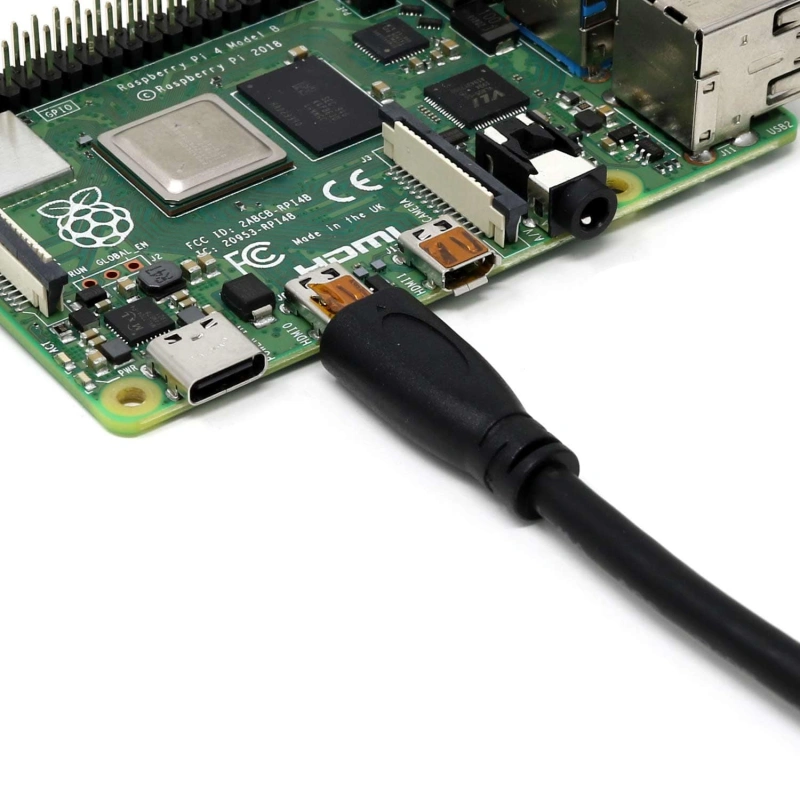
Although Micro HDMI ports are small, they’re very common on compact devices such as cameras, camcorders, tablets, and Raspberry Pi. When you want to output the video feed from these devices to a TV, monitor, or capture card, you’ll need a Micro HDMI cable or adapter.
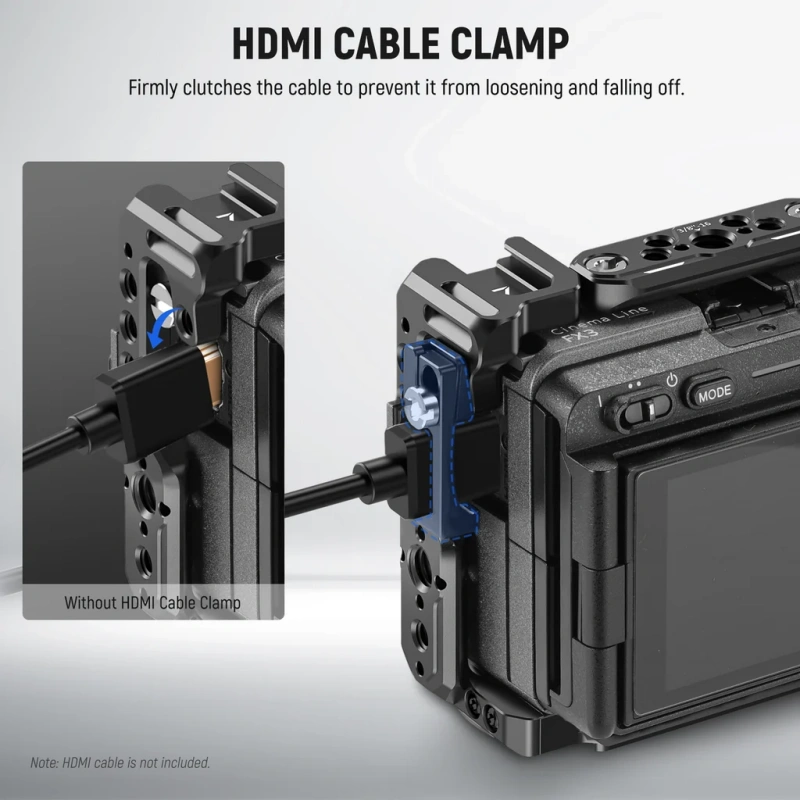
However, it’s easy to run into problems when choosing a cable. For devices like cameras, gimbals, or those that are moved around frequently, the Micro HDMI connector’s small size makes it prone to becoming loose or even losing the signal connection.
This guide will cover Micro HDMI connector specifications, the differences between various HDMI connectors, 4K audio and video capabilities, cable and adapter selection, common issues, and OEM customization requirements to help you choose the right Micro HDMI connectivity solution.
What Is a Micro HDMI Cable?
A Micro HDMI cable is an HDMI cable that uses an HDMI Type D connector. HDMI stands for High-Definition Multimedia Interface and is primarily used to transmit digital video, digital audio, and related control signals between devices.
It is important to note that “Micro HDMI” refers to the connector type, not a separate video format. Before selecting a cable, you should first check the connector type on your device, rather than simply looking for “HDMI” in the product title.
HDMI Type D Connector Size and Pin Count
The official name for Micro HDMI is HDMI Type D. The connector measures approximately 6.4 mm × 2.8 mm, which is significantly smaller than a standard HDMI connector, making it suitable for portable devices with limited space. Despite its small size, the Type D connector still has 19 pins.
These contacts collectively handle high-speed audio and video data, as well as functions such as device identification, control, and connection status. When selecting a cable, there are two key points to keep in mind:
1. Don’t assume it’s necessarily a Micro HDMI just because the connector looks small.
Micro HDMI is easily confused with other small connectors, such as Mini HDMI and Micro USB. The correct approach is to check the connector specifications in the device manual to confirm whether it explicitly states “HDMI Type D,” “Micro HDMI,” or “Micro HDMI output.”
2. The 6.4 × 2.8 mm measurement describes the approximate dimensions of the connector itself; it does not mean that the entire cable’s plug housing is that small.
Actual products also include plastic overmolding, stress-relief structures, and the cable itself. You need to check the width, thickness, and cable exit direction of the plug housing.
Common Cameras, Tablets, and Embedded Devices
1. Digital Cameras and Camcorders
These devices need to output video to an external monitor or capture card, but space inside the body is extremely limited; therefore, some models use Type D instead of standard HDMI.
2. Tablets and Portable Devices
To reduce the thickness of the device and save space on the motherboard, some early tablets used Micro HDMI as the video output port. However, it is important to note that the video interface on tablets is not fixed to Micro HDMI; different brands or generations may use Mini HDMI or USB-C. When selecting a model, refer to the official specifications for the specific model.
3. Embedded Devices and Development Boards
In embedded applications such as development boards, single-board computers, and industrial control devices, PCB space is at a premium, making the advantages of small HDMI connectors very evident.
How Does Micro HDMI Compare with Mini and Standard HDMI?
Micro HDMI, Mini HDMI, and Standard HDMI all belong to the HDMI connector family; they differ in the physical size of their connectors and their intended applications.
Standard HDMI uses Type A, Mini HDMI uses Type C, and Micro HDMI uses Type D. The three connectors differ in shape and size and are not directly interchangeable; however, they can all be used for HDMI audio and video connections.
When selecting a cable, you should first ask yourself two questions: What type of connector does the device actually use, and what performance level is required for the entire connection chain?
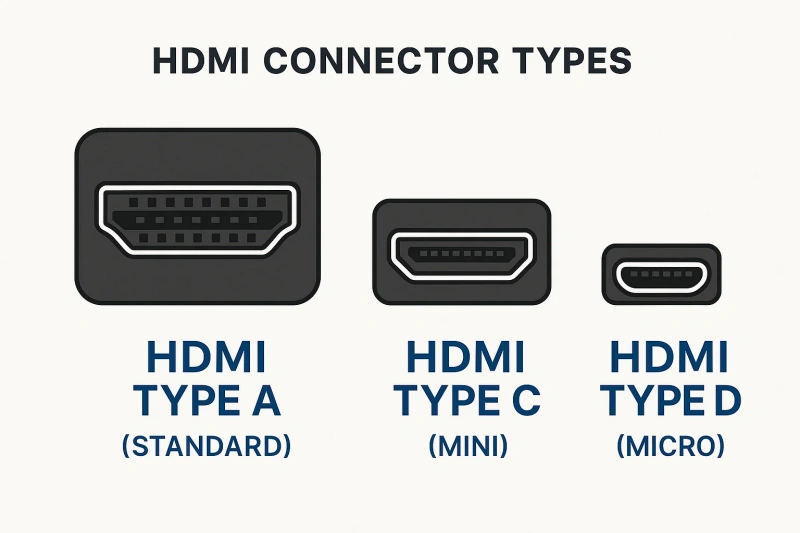
Type A vs. Type C vs. Type D Connectors
| Comparison | Type A | Type C | Type D |
|---|---|---|---|
| Common Name | Standard HDMI | Mini HDMI | Micro HDMI |
| Relative Size | Largest | Medium | Smallest |
| Main Use | General HDMI connections | Space-saving devices | Compact devices |
| Common Devices | TVs, monitors, PCs, game consoles, AV equipment | Cameras, camcorders, small devices | Compact cameras, portable and embedded devices |
| Pin Count | 19 pins | 19 pins | 19 pins |
| Space Advantage | Largest footprint | More compact than Type A | Best for limited space |
| Mechanical Characteristics | Larger and easier to handle | Balance of size and durability | More sensitive to strain and cable weight |
| Selection Focus | Confirm Type A port | Do not confuse with Micro HDMI | Check plug size, cable direction, and strain relief |
| Common Mistake | Assuming Type A has better performance | Confusing Mini HDMI with Micro HDMI | Assuming every small HDMI port is Micro HDMI |
Connector Size Does Not Define HDMI Performance
When selecting HDMI cables, many people mistakenly believe that “the larger the connector, the better the performance.” In reality, Type A, Type C, and Type D simply refer to the physical dimensions of the connectors.
As long as the device controller, connectors, and cable all meet the bandwidth requirements, even a small Micro HDMI connector can support the full 48 Gbps of the HDMI 2.1 standard.
When actually selecting a cable, we recommend following this order of steps:
1. First, confirm whether the physical connectors are compatible. If the source device has a Type D connector and the display has a Type A connector, choose a Type D to Type A adapter;
2. Next, check the official specifications of the devices to confirm the HDMI versions and output capabilities supported by both the source device and the display. Do not rely on connector size to guess performance;
3. Finally, check the cable’s certification level. Look for the official HDMI LA logo, which is far more reliable than labels such as “Micro,” “Mini,” or “Standard.”
Tip: Adapters, extension cables, and short adapters in the signal chain are all part of the signal path. HDMI LA provides separate implementation guidelines for different types of passive adapters. Different adapter products have specific usage restrictions defined by their manufacturers; therefore, one cannot assume that “simply changing the connector shape has absolutely no impact on performance.”
What Video and Audio Can Micro HDMI Support?
Micro HDMI itself does not specify a fixed resolution, refresh rate, or audio quality. Micro HDMI is simply the physical form of the HDMI Type D connector; the actual transmission capabilities depend on the source device, the receiving device, the HDMI implementation, and whether the cable itself provides the required bandwidth.
Resolution, Refresh Rate, HDR, Audio, Ethernet, and ARC Considerations
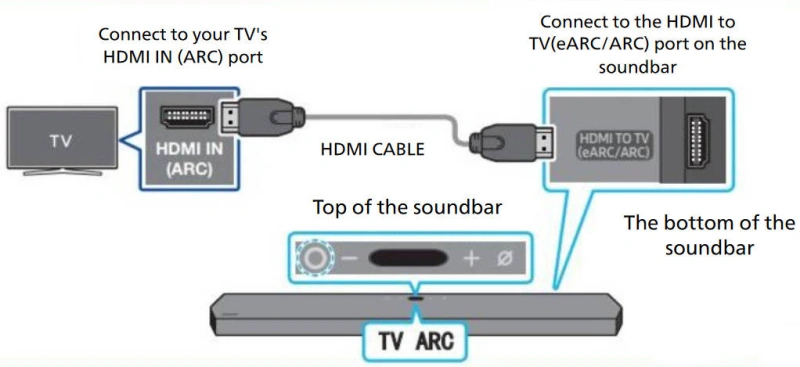
| Feature | What It Means | What to Check | Key Note |
|---|---|---|---|
| Resolution | Pixel count, such as 1080p or 4K | Source, display, and cable support | Micro HDMI is not limited to 1080p |
| Refresh Rate | Screen updates per second, such as 30, 60, or 120 Hz | Check 4K30, 4K60, or the required mode | 4K support does not mean every refresh rate |
| HDR | Wider brightness and color range | Both source and display must support HDR | A cable cannot add HDR to unsupported devices |
| Audio | Digital audio transmitted with video | Supported audio formats and channels | HDMI does not guarantee every audio format |
| ARC | Returns TV audio to a soundbar or AV receiver | Both devices and HDMI ports must support ARC | Rarely needed for camera or embedded outputs |
| eARC | Higher-bandwidth audio return | Both connected devices must support eARC | Cable bandwidth alone does not enable eARC |
| Ethernet / HEC | Shares network connectivity over HDMI | Both devices and cable must support HEC | An Ethernet HDMI cable cannot add HEC support |
| Micro HDMI | HDMI Type D connector format | Check the complete HDMI signal chain | Connector size does not define performance |
The Role of the Source Device and Cable Certification
The Role of the Source Device
The source device is the starting point of the signal in the entire HDMI chain, and its output capabilities directly determine the system’s upper limit. The first step in selecting equipment is not to look at the cable, but to check the source device’s official specifications to confirm which resolutions, refresh rates, HDR, and audio formats it actually supports.
The Significance of Cable Certification
HDMI officially classifies cables by performance levels rather than by version numbers. Currently, the mainstream certification levels include:
- High Speed HDMI Cable: Up to 10.2 Gbps, supports 4K@30Hz
- Premium High Speed HDMI Cable: Up to 18 Gbps, supports 4K@60Hz and HDR
- Ultra High Speed HDMI Cable: Up to 48 Gbps, supports 4K@120Hz, 8K@60Hz, eARC, VRR, and other HDMI 2.1 features
Which Micro HDMI Cable or Adapter Do You Need?
When choosing a Micro HDMI cable or adapter, you should check the types of connectors at both ends, whether the connection will be permanent, whether there is sufficient space around the device, and whether the cable will be moved frequently.
For the most common scenarios—such as connecting a Micro HDMI Type D port on a camera or embedded device to a Standard HDMI Type A port on a TV, monitor, or capture card—there are two options:
- Use a Micro HDMI-to-HDMI cable directly
- Use a Micro HDMI adapter followed by a standard HDMI cable.
Micro HDMI-to-HDMI Cable vs. Adapter
| Comparison | Micro HDMI-to-HDMI Cable | Micro HDMI Adapter + HDMI Cable |
|---|---|---|
| Structure | Direct Type D to Type A cable | Adapter plus a standard HDMI cable |
| Typical Ends | Type D Male → Type A Male | Type D Male → Type A Female + Type A cable |
| Connection Points | Fewer | More |
| Mechanical Reliability | Simpler with fewer loose points | More joints to secure and support |
| Best For | Direct camera-to-display or capture connections | Existing HDMI wiring or replaceable cables |
| Length Changes | Replace the whole cable | Replace only the standard HDMI cable |
| Tight Spaces | Use flexible or right-angle versions | Use a short pigtail adapter |
| Mobile Devices | Lightweight, flexible cable preferred | Adapter and heavy cable may increase port strain |
| Main Advantage | Simple, compact, and easy to route | Flexible and easy to reconfigure |
| Key Note | Choose the correct ends, length, and cable direction | Do not let heavy adapters or cables hang from the Micro HDMI port |
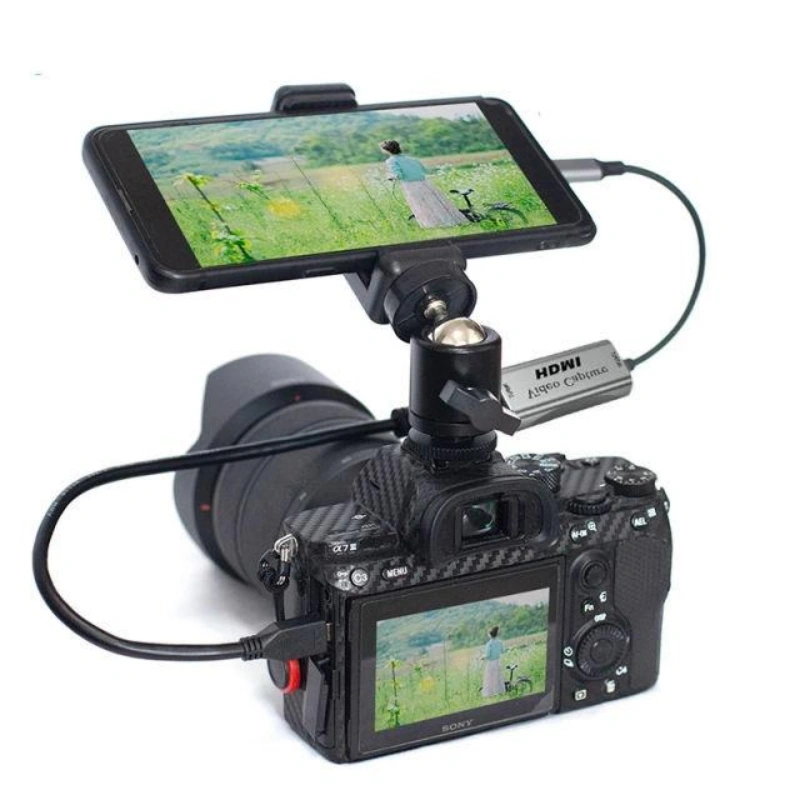
Male/Female Ends, Direction, Length, and Port Clearance
When selecting a cable, in addition to considering connector types and bandwidth certifications, physical compatibility is equally critical. Focus primarily on the following four aspects:
1. Male/Female Connector Compatibility
Basic Definition: “Male” refers to the plug that inserts into a device, while “Female” refers to the port that accepts the plug. For example, the Micro HDMI port on a camera is a Type D Female connector, so connecting to it requires a Type D Male plug.
Common Combinations: Direct cables are Micro HDMI Type D Male to Standard HDMI Type A Male; adapters are Micro HDMI Type D Male to HDMI Type A Female, used to connect to standard HDMI cables.
Tip: Do not simply search for “Micro HDMI adapter.” Before purchasing, be sure to confirm the male/female attributes of both ends and ensure they match individually.
2. Direction Identification
Passive Adapters: Standard passive HDMI adapters have no directional restrictions; the connector size itself does not define the video transmission direction.
Active Devices: If a product contains active electronic circuitry (such as active converters or optical HDMI), it will have clear “Source” and “Display” labels. Connections must strictly follow these labels and must not be reversed.
3. Length Selection
Longer cables pose greater challenges for high-speed signal transmission, especially in high-bandwidth modes with high resolution and high refresh rates.
Do not blindly choose excessively long cables; select a length that is sufficient for the installation while allowing for reasonable routing flexibility.
4. Allowing for Port Clearance
Check not only whether the metal connector fits into the port but also whether there is sufficient space around the connector’s injection-molded housing. Device protective cases, camera cages, and the edges of enclosures may obstruct the connector.
Right-Angle, Locking, Flexible, and High-Flex Options
When device space is limited or cables need to move frequently, standard straight connectors are often insufficient. In such cases, consider the following four types of special designs:
1. Right-Angle Connectors
These allow the cable to turn 90° near the connector, significantly reducing the space required at the back or sides of the device. They are a common solution for compact devices.
Key Consideration: Elbows come in four cable exit directions—up, down, left, and right. Selecting the wrong direction may block the battery compartment, USB port, or other ports on the device. You must confirm the actual installation orientation of the device; do not rely solely on the product name.
2. Locking/Fixed (Locking)
Suitable for scenarios involving vibration, movement, or situations where cables are prone to being pulled; commonly found in camera systems, mobile platforms, and industrial equipment.
Key Consideration: When selecting a model, ensure the locking mechanism is compatible with the device or rack, and that the tensile force is absorbed by the structural components rather than being transmitted to the Micro HDMI port.
3. Flexible Cable
Suitable for cameras, gimbals, or cabling in confined spaces. The thicker and stiffer the cable, the greater its bending recovery force; these forces are directly transmitted to the small Type D connector, increasing mechanical stress. For short-distance connections, prioritize flexible cables, as they facilitate cabling and protect the connector.
4. High-Flex
Designed specifically for applications involving repetitive motion, such as robots, mobile platforms, and camera heads.
- Key Note: “High-Flex” is not a performance guarantee; it does not imply that the cable can be bent an unlimited number of times. You must confirm this with the supplier.
- Specific Parameters: Minimum dynamic bending radius, bending test conditions, number of cycles, motion patterns, and post-test electrical performance requirements.
What Causes Micro HDMI Connection Problems?
Micro HDMI connection issues can stem from two main categories: unstable mechanical connections and abnormalities in the HDMI signal chain.
Mechanical issues are relatively straightforward, such as a loose connector, a cable that is too heavy, or lateral pull on the plug;
signal issues may manifest as a black screen, screen flickering, intermittent loss of video, no sound, or the device sometimes recognizing the connection and sometimes not.
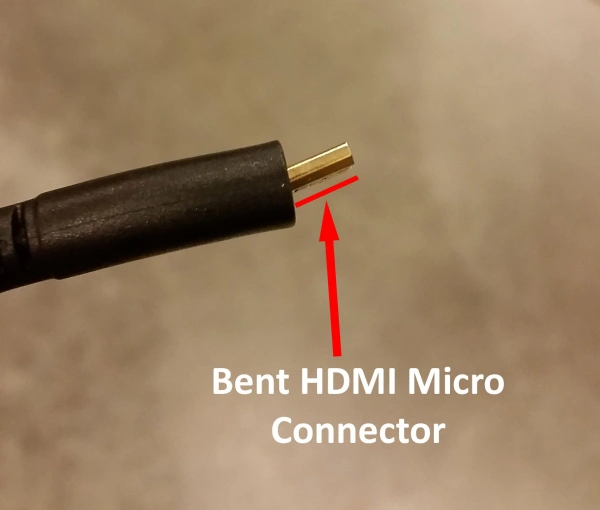
Fragile Ports, Cable Strain, Handshake Errors, and Signal Dropouts
1. Fragile Ports
The Type D port measures only 6.4 mm × 2.8 mm, making it inherently less mechanically robust than the Type A port. As a result, it is more susceptible to damage from external forces in applications such as cameras and portable devices.
Signs of mechanical damage:
- The image disappears or returns when the plug is gently shaken
- The device works normally when stationary but the screen flickers when moved
- The plug cannot be held securely in place
- The display only works when the plug is pressed in a specific direction
If any of these situations occur, prioritize checking the mechanical connection rather than lowering the resolution.
2. Cable Strain
This refers to the continuous application of cable weight, bending force, or tensile force on the connector. Allowing the cable to sag immediately after it exits the port or forcing it to bend over a short distance places additional strain on the Type D connector.
Best practice: Allow for a natural curve near the device and use stress-relief structures such as mounting clamps or camera cage cable clamps to ensure that external tension is borne by structural components rather than being entirely applied to the Micro HDMI port.
3. HDMI Handshake
A handshake is the process by which the source device and display exchange capability information before transmission. It primarily involves two protocols:
- EDID: The display informs the source device of its supported resolutions, refresh rates, and other capabilities.
- HDCP: Encryption and authentication for copyright-protected content. Version mismatches (e.g., the source requires HDCP 2.2, but the receiver only supports 1.4) will prevent protected content from playing.
4. Signal Dropout
The picture or sound briefly disappears and then returns. If the low-resolution display remains stable while the high-resolution display frequently flickers, this typically indicates signal integrity issues or insufficient bandwidth headroom, rather than a hardware failure in the devices.
Key Principle: You cannot determine the cause with 100% certainty based on a single symptom. The correct approach is to troubleshoot by changing one variable at a time, rather than replacing all devices at once.
A Practical Troubleshooting Checklist
If you experience a black screen, screen flickering, no sound, or random disconnections with Micro HDMI, you can troubleshoot the issue by following the steps below.
| Step | What to Do | Why |
|---|---|---|
| 1. Check the Port | Confirm it is Micro HDMI Type D, not Mini HDMI | Rule out connector mismatch |
| 2. Reconnect | Unplug and firmly reconnect both ends | Rule out poor contact |
| 3. Check Cable Strain | Check for pulling from heavy cables or adapters | Reduce stress on the small Micro HDMI port |
| 4. Remove Adapters | Test with a direct Micro HDMI-to-HDMI cable | Eliminate extra connection points |
| 5. Try Another Cable | Use a known-good cable rated for the target video mode | Identify cable faults or insufficient performance |
| 6. Lower the Video Mode | Reduce resolution or refresh rate temporarily | Check for bandwidth or signal integrity issues |
| 7. Check the Input | Select the correct HDMI input on the display or capture device | Rule out incorrect input settings |
| 8. Check the Output | Confirm HDMI output and a compatible video mode are enabled | Ensure the source is sending a valid signal |
| 9. Check HDCP | Verify HDCP compatibility if protected content is black | HDCP issues can block protected video |
| 10. Cross-Test Devices | Try another display, capture device, or source | Locate the fault in the source, cable, or sink |
| 11. Inspect the Port | Check for looseness or damage if movement causes dropouts | Prevent further mechanical damage |
| 12. Restore the Target Setup | Gradually restore the required resolution, refresh rate, and routing | Confirm the issue is fully resolved |
How Should OEMs Specify a Custom Micro HDMI Assembly?
When customizing Micro HDMI cable assemblies, OEMs must define electrical performance, mechanical retention, shielding structure, bend requirements, jacket dimensions, and validation methods.
Since the Micro HDMI Type D connector itself is a very compact 19-position connector, OEMs must pay particular attention to mechanical loads and assembly space.
Mechanical Retention, Shielding, Bend Life, Overmolding, and Testing
1. Mechanical Retention
- Core Objective: The goal is not to make the plug “tighter,” but to prevent cable tension and bending forces from being continuously transmitted to the small Micro HDMI connector.
- For desktop devices: A standard plug-and-socket design is sufficient.
- Cameras/gimbals/robots/mobile devices: Additional consideration must be given to cable securing, clamps, external locking mechanisms, or stress-relief structures.
- Specifications must clearly state: connector model or compatible interface, plug housing dimensions, permitted cable exit directions, and whether clamps, screws, or retention features are required. The design phase must be based on official product drawings, not web images or measurements taken from samples.
2. Shielding
Simply stating “shielded cable” is too vague. The following must be specified: internal shielding structure, shield termination method at the connector ends, and the method of connecting the shield to the connector’s metal housing.
Shielding design cannot be evaluated solely based on the “presence or absence of aluminum foil.” The shielding layer, twisted-pair structure, grounding method, connector termination, and cable length collectively determine the final EMI performance; it is necessary to verify that the finished cable assembly meets the target HDMI mode and EMC requirements.
3. Bend Life
Static Installation: Focus on the minimum bend radius.
Dynamic Applications (Pan-Tilt Heads/Robots/Repeatedly Opening and Closing Mechanisms): Suppliers must clearly specify test conditions—bend radius, movement angle, load, speed, number of cycles, and post-test acceptance criteria.
Claims such as “100,000 cycles” or “high flex” without specified test conditions cannot be used for cross-comparison among suppliers; OEMs should not arbitrarily adopt cycle counts as generic requirements.
4. Overmolding
Purpose: Mechanical protection, stress relief, and formation of a stable profile.
The space around a Type D connector is extremely limited; just because a metal plug fits does not mean the overmolded part will fit—even a 0.5 mm difference in housing dimensions can result in assembly failure.
Drawings should define at least the following:
| Specification | What the OEM Should Define |
|---|---|
| Connector | Type D, mating-end type, connector part number, or approved source |
| Plug Envelope | Maximum plug and overmold width, height, and length |
| Cable Exit | Straight, 90°, or specified exit direction |
| Strain Relief | Required length and mechanical design |
| Cable OD | Allowed finished cable outer-diameter range |
| Overmold Material | Required material or performance properties |
| Interface Clearance | Required clearance from the enclosure, nearby ports, and clamps |
Recommendations for Material Selection: First, define the requirements for temperature, flexibility, wear resistance, flame retardancy, and chemical resistance; then have suppliers propose material solutions and submit data, rather than arbitrarily specifying hardness or grades.
5. Testing
A distinction must be made between HDMI compliance testing and the OEM’s own product reliability testing. The HDMI Compliance Test Specification (CTS) sets the minimum compliance requirements; passing CTS or ATC tests does not guarantee that the product will function properly in all applications or interoperate with all devices. OEMs must still conduct additional validation based on actual usage environments.
Custom Micro HDMI Component Validation Project:
| Test Category | What It Verifies |
|---|---|
| Continuity | Correct conductor and pin connections |
| Short / Open Check | Short circuits, open circuits, or miswiring |
| Signal Performance | High-speed performance for the target HDMI mode |
| Mechanical Fit | Proper fit of the plug, overmold, and device structure |
| Retention / Pull Test | Connector and cable integrity under specified pull force |
| Bend / Flex Test | Mechanical and electrical performance after repeated bending |
| Environmental Test | Performance under temperature, humidity, and other required conditions |
| System Interoperability | Compatibility with actual sources, displays, and capture devices |
Prototype and Supplier Qualification Questions
| Item | What to Confirm | Why It Matters |
|---|---|---|
| Mechanical Fit | Plug fit, clearance, and routing | Prevents installation issues |
| Video Mode | Required resolution and refresh rate | Confirms target performance |
| Part Numbers | Exact cable and connector parts | Prevents unapproved changes |
| High-Speed Test | Test method, length, and setup | Verifies signal performance |
| Shielding | Shield design and termination | Affects EMI and signal integrity |
| Bend Life | Radius, cycles, and test conditions | Makes flex claims measurable |
| Overmolding | Size, material, and strain relief | Prevents fit and strain problems |
| Electrical Test | Continuity, open, and short checks | Finds basic wiring defects |
| Traceability | Lots, dates, and inspection records | Supports fault tracking |
| Change Control | OEM approval for key changes | Keeps production consistent |
| Qualification | Reports and test conditions | Confirms verified performance |
| HDMI Compliance | Applicable licensing and test status | Confirms compliance scope |
Frequently Asked Questions About Micro HDMI Cables
Q1: Is Micro HDMI the same as Mini HDMI?
No. Micro HDMI is Type D, while Mini HDMI is Type C. The two differ in size and connector design, so they are not directly interchangeable. Be sure to check the device manual to confirm the connector type before purchasing.
Q2: Does Micro HDMI support 4K?
Yes, but not all Micro HDMI devices support 4K. Actual capability depends on whether the source device, display, and cable all support the corresponding 4K resolution and refresh rate.
Q3: Can Micro HDMI be converted to USB-C?
Yes, but this usually requires an active adapter; a simple passive adapter alone is not sufficient. You’ll also need to confirm that the USB-C device supports the corresponding video input or output functions, as not all USB-C ports support video.
Q4: Are Micro HDMI cables bidirectional?
Standard passive Micro HDMI-to-HDMI cables generally do not restrict signal direction based on connector size. However, if the cable or adapter contains an active chip, optical fiber, or other electronic circuitry, it may be labeled with “Source” and “Display” directions; in such cases, you must connect them according to the labels.
Conclusion: Micro HDMI Cable Guide: Uses, Specs, and Selection
There is no one-size-fits-all answer when it comes to choosing the right Micro HDMI cable. You need to make a comprehensive assessment based on the device’s connector type, target resolution and refresh rate, cable length, installation space, and mechanical reliability.
As a professional cable assembly supplier, Linkwings offers Micro HDMI-to-HDMI cables and custom cable assembly solutions. These can be designed to meet specific requirements regarding connector type, cable length, shielding, jacket material, cable exit direction, and mechanical structure, helping you select the most suitable and reliable Micro HDMI connectivity solutions for consumer electronics, camera equipment, embedded systems, and OEM projects.

Nicole
The founder of Linkwings Electronics.
10+ Years Experience | 1000+ Global Projects Completed
Specialized in:
- Custom Wire Harness Assembly
- Automotive & Industrial Cable Harness Manufacturing
- Precision Crimping & Terminal Processing
- OEM / ODM Wire Harness Solutions
Need help with your project?
Let Linkwingselec deliver your next wire harness solution.